
.png)
Description
Download Maid of Speeches – AI‑Powered Maid of Honor Speech Writer
Introduction: Why Maid of Speeches Is a Game‑Changer for Wedding Speakers
Planning a wedding already demands countless decisions, and writing a heartfelt maid of honor speech often feels like the final, most stressful hurdle. Maid of Speeches removes that anxiety by delivering an AI‑driven, web‑based tool that creates polished, personalized speeches in minutes. Powered by advanced language models and refined with insights from a bestselling author, this software captures your unique anecdotes, preferred tone, and the emotional nuance you want to convey. Whether you’re a first‑time speaker or a seasoned toast‑maker, the platform guides you step‑by‑step, producing a draft you can instantly edit, expand, or trim. The inclusion of a video public‑speaking course further boosts confidence, ensuring you not only have perfect words but also the poise to deliver them. With a satisfaction guarantee, Maid of Speeches promises a secure, hassle‑free experience that transforms a daunting task into an enjoyable, creative process. Ideal for anyone looking to download a free trial, secure their speech, and receive regular updates, this tool works across Windows, Mac, Android, and iOS browsers, making it truly universal.
Core Features & Benefits: What Sets Maid of Speeches Apart
- Real‑time AI interview: Collects personal stories, favorite memories, and tone preferences through an interactive chat.
- Instant draft generation: Produces a fully structured speech in under two minutes.
- Unlimited editing: Add, delete, or rewrite sections without limits, preserving your voice.
- Public‑speaking video course: 45‑minute professional training to improve delivery, pacing, and confidence.
- Multi‑device compatibility: Works on any modern browser, from desktop Windows and Mac to Android and iOS tablets.
- Secure cloud storage: Saves drafts encrypted, allowing you to return and refine anytime.
- One‑click export: Download as PDF, DOCX, or plain text for offline use or printing.
- Regular AI updates: Continuous improvements ensure the language stays fresh and culturally relevant.
- Satisfaction guarantee: Full refund within 30 days if the speech doesn’t meet expectations.
Pros
- Fast, AI‑generated drafts save hours of writing time.
- Personalized tone and anecdotes make speeches feel authentic.
- Unlimited revisions mean you’re never stuck with a final version.
- Free video course adds real value beyond the software.
- Cross‑platform accessibility eliminates device constraints.
Cons
- Requires an internet connection for AI processing.
- Initial free trial limits the number of saved drafts.
- Advanced users may prefer deeper manual control over structure.
Installation, Usage & Compatibility: Getting Started in Three Simple Steps
Because Maid of Speeches is a web‑based application, there is no traditional installation process. Follow these three steps to start crafting your speech:
- Visit the official website (secure https://maidofspeeches.com) and click the “Start Free Trial” button. The platform automatically detects your operating system and optimizes the UI for Windows, macOS, Android, or iOS browsers.
- Create an account using your email or a social login (Google, Apple). All personal data is encrypted, complying with GDPR and CCPA standards, ensuring your anecdotes remain private.
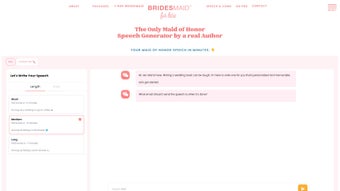
- Begin the AI interview. Answer a series of guided prompts—how you met the bride, favorite shared moments, desired humor level, and speech length. The AI synthesizes this information and generates a draft you can edit instantly.
Once your draft is ready, you can use the built‑in editor to rearrange paragraphs, tweak wording, or add new stories. When satisfied, click “Export” to download a PDF or DOCX file, ready for printing or rehearsal. The platform also offers a “Save to Cloud” button, storing your work securely for future revisions.
Maid of Speeches runs flawlessly on any modern browser, including Chrome, Safari, Edge, and Firefox, across Windows 10/11, macOS Monterey and later, Android 9+, and iOS 13+. Because it’s a SaaS solution, updates are applied automatically—no manual patches or version checks are required.
Frequently Asked Questions (FAQ)
Is Maid of Speeches really free to use?
You can start with a 7‑day free trial that includes unlimited speech drafts and full access to the video course. After the trial, a modest subscription fee unlocks ongoing AI updates and premium export options.
Can I use Maid of Speeches on my phone?
Absolutely. The web app is fully responsive and works on Android and iOS browsers, letting you craft and edit speeches from any smartphone or tablet.
How secure is my personal information?
All data is encrypted in transit (TLS 1.3) and at rest (AES‑256). We never share your anecdotes with third parties, and you can delete your account and all associated data at any time.
What if I don’t like the AI‑generated draft?
The platform allows unlimited edits, and you can restart the interview process as many times as you need. If you’re still unsatisfied within the first 30 days, you can request a full refund.
Do I need any special software to export my speech?
No additional software is required. Exported files are standard PDF or DOCX formats that open on any computer, tablet, or smartphone with a compatible viewer.
Conclusion & Call‑to‑Action: Make Your Maid of Honor Speech Shine
Writing a maid of honor speech should be a celebration, not a source of stress. Maid of Speeches combines cutting‑edge AI, a user‑friendly interface, and a complimentary public‑speaking course to give you everything you need for a memorable tribute. By downloading the free trial, you instantly unlock a secure, cloud‑based workspace that works on Windows, Mac, Android, and iOS—so you can craft, edit, and perfect your speech wherever inspiration strikes. The satisfaction guarantee and regular updates ensure you’re never left behind as language trends evolve. Ready to turn anxiety into applause? Start your free trial today and deliver a speech that truly honors the bride.
Guides & Tutorials for Maid of Speeches
How to install Maid of Speeches
- Click the Preview / Download button above.
- Once redirected, accept the terms and click Install.
- Wait for the Maid of Speeches download to finish on your device.
How to use Maid of Speeches
This software is primarily used for its core features described above. Open the app after installation to explore its capabilities.
User Reviews for Maid of Speeches 0
No reviews found




